---
title: How to hide Price Comparison Tools for certain properties?
description: Tool Display, Hide Tool, Activate Tool, De-activate Tool
---
[Skip to content](https://support.directbookingtools.com/how-to-hide-price-comparison-tools-for-certain-properties#main-content)
English
Show submenu for translations
[Request More Support](https://support.directbookingtools.com/kb-tickets/new?hsLang=en) [Customer portal](https://support.directbookingtools.com/tickets-view?hsLang=en)

Open main navigation
Close main navigation
- English
Show submenu for translations
- [Request More Support](https://support.directbookingtools.com/kb-tickets/new)
- [Customer portal](https://support.directbookingtools.com/tickets-view)
How can we help you?
- There are no suggestions because the search field is empty.
1. [Knowledge Base](https://support.directbookingtools.com/?hsLang=en)
2. [Price Comparison Tool](https://support.directbookingtools.com/price-comparison-tool?hsLang=en)
3. [Property Settings](https://support.directbookingtools.com/price-comparison-tool?hsLang=en#property-settings)
June 4, 2025
# How to hide Price Comparison Tools for certain properties?
## This will help you hide the PCT on your website
---
####  Prerequisites
- Access to the Direct Booking Tools Dashboard
- Familiarity with DBT Dashboard
- Know the name(s) of the properties in which you want to hide
---
####  Step-by-Step Instructions
### **Step 1: Log into your dashboard**
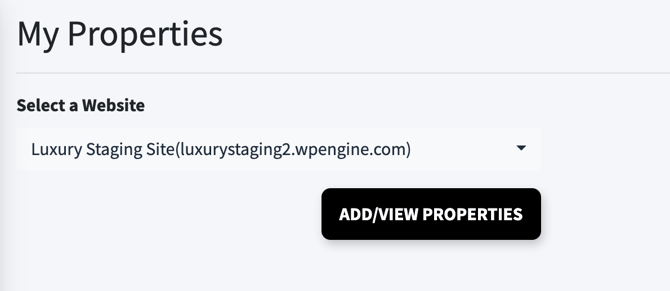
Once logged into the dashboard choose **My Properties**
> Then you will need to click the button ADD/VIEW PROPERTIES
>
> 
>
>
### **Step 2: View properties enabled in the dashboard**
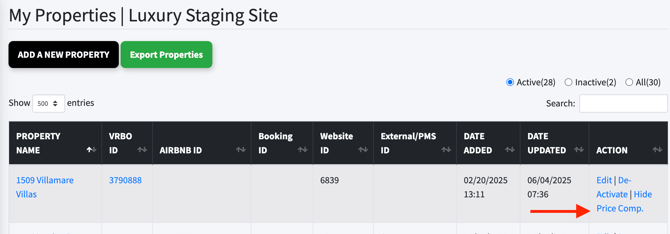
Scroll and find the property you would like to hide the Price Comparison Tool and then on the right side of that property will be an option for you to select "Hide Price Comp."
When you choose this it will hide the PCT tool from firing on your website.
### **Step 3: Check Action**
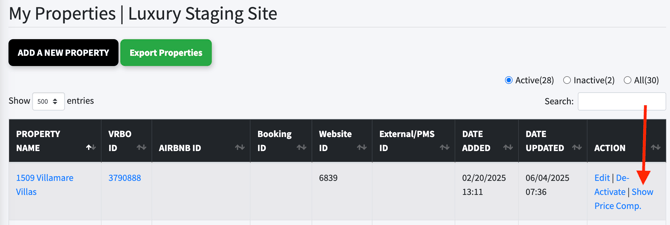
When you choose the "Hide Price Comp." it will change to "Show Price Comp. E.g. see below
---
####  Tips
If you made a mistake, or wish the property to show the Price Comparison Tool widget, you simply will select again, the property but now it will say "Show Price Comp." and you have re-enabled it.
- [General](https://support.directbookingtools.com/general?hsLang=en#main-content)
- [Dashboard Access](https://support.directbookingtools.com/general?hsLang=en#dashboard-access)
- [Marketing](https://support.directbookingtools.com/general?hsLang=en#marketing)
- [Code Insertion](https://support.directbookingtools.com/general?hsLang=en#code-insertion)
- [Support](https://support.directbookingtools.com/general?hsLang=en#support)
- [Troubleshooting](https://support.directbookingtools.com/troubleshooting?hsLang=en#main-content)
- [Tool Designer](https://support.directbookingtools.com/troubleshooting?hsLang=en#tool-designer)
- [Escalating Support](https://support.directbookingtools.com/troubleshooting?hsLang=en#escalating-support)
- [Account Access](https://support.directbookingtools.com/account-access?hsLang=en#main-content)
- [Users](https://support.directbookingtools.com/account-access?hsLang=en#users)
- [Analytics](https://support.directbookingtools.com/account-access?hsLang=en#analytics)
- [Properties Settings](https://support.directbookingtools.com/properties-settings?hsLang=en#main-content)
- [Add/Edit Properties](https://support.directbookingtools.com/properties-settings?hsLang=en#add-edit-properties)
- [Price Comparison Tool](https://support.directbookingtools.com/price-comparison-tool?hsLang=en#main-content)
- [Property Settings](https://support.directbookingtools.com/price-comparison-tool?hsLang=en#property-settings)
- [Troubleshooting](https://support.directbookingtools.com/price-comparison-tool?hsLang=en#troubleshooting)
- [Tool Designer](https://support.directbookingtools.com/price-comparison-tool?hsLang=en#tool-designer)
- [Code Insertion](https://support.directbookingtools.com/price-comparison-tool?hsLang=en#code-insertion)
- [Cart Saver Tool](https://support.directbookingtools.com/cart-saver-tool?hsLang=en#main-content)
- [Tool Designer](https://support.directbookingtools.com/cart-saver-tool?hsLang=en#tool-designer)
- [Cart Abandonment](https://support.directbookingtools.com/cart-saver-tool?hsLang=en#cart-abandonment)
- [Analytics](https://support.directbookingtools.com/analytics?hsLang=en#main-content)
- [DBT Dashboard](https://support.directbookingtools.com/analytics?hsLang=en#dbt-dashboard)
- [Forward Looking Demand](https://support.directbookingtools.com/analytics?hsLang=en#forward-looking-demand)
- [Rate Parity Monitoring](https://support.directbookingtools.com/analytics?hsLang=en#rate-parity-monitoring)
- [Tracking](https://support.directbookingtools.com/analytics?hsLang=en#tracking)
- [Notifications](https://support.directbookingtools.com/notifications?hsLang=en#main-content)
- [Users](https://support.directbookingtools.com/notifications?hsLang=en#users)
- [Reports](https://support.directbookingtools.com/notifications?hsLang=en#reports)
- [Billing](https://support.directbookingtools.com/billing?hsLang=en#main-content)
- [Change Billing](https://support.directbookingtools.com/billing?hsLang=en#change-billing)
- [Cancel Account](https://support.directbookingtools.com/billing?hsLang=en#cancel-account)
- [Subscription](https://support.directbookingtools.com/billing?hsLang=en#subscription)
# Booking Insights
[mailto:email@email.com](mailto:email@email.com)
Copyright © 2026, Booking Insights